

Swaydesk is made of components of its own, nearly all written in Rust with GTK 4. Each one has its shortcut and a part in the guide.
The shortcuts on this page are those of the Swaydesk profile, the default. The other profiles (i3, Hyprland, niri and dwm) change many of them: see them all in Shortcuts.
Nearly every component can be turned off. The last line of each one shows the key, which goes in ~/.config/swaydesk/config.toml; see Turning components off.
Bar and popups
All of them at once with swaydesk-bar, which also brings the volume and brightness indicator and the keyboard layout. The notification center comes in its own package, swaydesk-notifd.
On Arch, pacman doesn't install the optional dependencies; the usual ones, in one line (pacman lists them after the install; see each page for what each one is for):
sudo pacman -S --asdeps networkmanager bluez upower wireplumber libpulse brightnessctl gammastep playerctl noto-fonts-emoji swaydesk-lock- Network Wi-Fi, wired and VPN: turn them on and off, connect and see the details.Click the network icon
- Bluetooth Turns Bluetooth on, finds devices, pairs, connects, forgets them and sends files.Click the Bluetooth icon
- Audio Volume and mute for the output and the microphone, and which device each one uses.Click the volume (middle click: pavucontrol)
- Battery Charge, time left, power draw, health, a 12-hour graph and the power profile.Click the battery
- Brightness and night light Screen brightness and the night light: off, on, or on the schedule you pick.Click the brightness icon; brightness keys
- Media Cover, title, progress and the controls of whatever player is playing.Click the media icon (only there while something plays)
- Weather The forecast for today and the next days, for the city you set or the one your IP points to.Click the temperature
- Calendar The month, with your country’s holidays.Click the date
- System CPU, memory, disk, temperature and the busiest processes, with “End”. The icon turns orange when something is tight.Click the system icon
- Caffeine Keeps the screen from locking and the computer from sleeping for 1 hour, 2 hours or always.Click the cup
-
Notification center
Notifications grouped by app, with their actions, and Do Not Disturb.
Super+C; click the bell -
Clipboard
The history of what you copied, with search, thumbnails and pinned items. Turned off, nothing more is saved to the history.
Super+V -
Keyboard layout
The current keyboard layout, in the bar. It hides when there’s a single layout, and counts only real keyboards.Click it, or
Super+Space
Windows and apps
- Dock Pinned and open apps, with a right-click menu. It hides when a window needs the room, or stays visible.Push the pointer against the bottom edge
-
App grid
Every installed app, with search, groups and favorites. The search also finds files, does math and converts units.
Super -
Launcher
rofi with four tabs: apps, open windows, clipboard and web search (with prefixes such as
wfor Wikipedia). One click opens an entry, and a click outside closes it (throughswaydesk-click-catcher).Alt+SpacePart of the full desktop (swaydesk-desktop) -
Window switcher
Windows in the order you used them, from every workspace, on a card in the middle of the screen.
Alt+Tab
Session
- Notifications The service that receives the apps’ notifications and shows the pop-ups in the corner.
- Volume and brightness indicator Icon, bar and percentage at the bottom of the screen, above the dock, for a second.Volume and brightness keys
-
Session menu
Lock, log out, suspend, restart and shut down. When an app asks to restart or shut down, such as the store’s Restart & Update, it asks first, with a 60-second countdown and a button to cancel.
Ctrl+Alt+Delete; the bar’s power button -
Restart after updates
A minimal session manager for Sway, so GNOME Software can restart or shut down after updates. It asks first through the session menu (
swaydesk-session-menu, which it recommends); without the menu, it restarts or shuts down at once.On its own, when an app asks -
Lock screen
Time, date and the password field on every monitor, over the blurred wallpaper. On Debian 13, whose gtk4-layer-shell is older than 1.2, the same lock screen runs in its GTK 3 version.
Ctrl+Alt+L; on its own after 10 minutes - Login screen A login screen on top of greetd, with the same look as the lock screen, on every supported distro, Arch included. It unlocks the keyring with your login password. The login screen you already use works too; without one, as on a minimal or server install, this is what gives you a graphical login.
- Keyring Fixes the first login’s keyring on Debian 13: at login, it checks whether gnome-keyring created your keyring without publishing it, and if so, shows a notice and asks for your password once, right away. From the second login on, the keyring unlocks by itself.
-
Administrator password
Starts the polkit agent: the window that asks for your password for administrator actions, such as mounting a disk. With no agent installed, a notification says so.When an app asks for permissionPart of the full desktop (
swaydesk-desktop)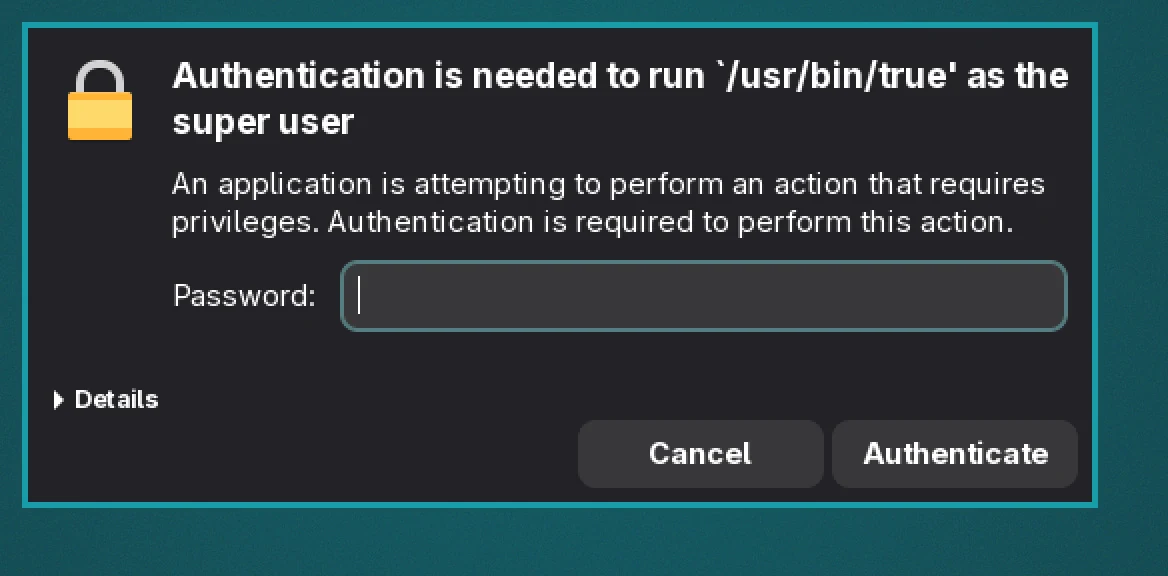
-
Update notifier
Starts the distro’s update notifier, which Sway doesn’t start by itself: GNOME Software’s, Ubuntu’s Software Updater or Discover’s. On Arch, Swaydesk has its own notice, with an icon in the bar: the official repositories, the AUR (through paru or yay, if installed), Flatpak apps and firmware; see Updates on Arch. Nothing is updated on its own.At loginPart of the full desktop (
swaydesk-desktop)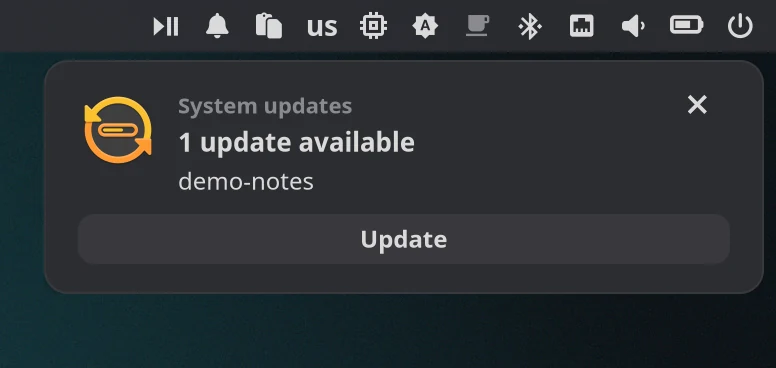
-
Night light
Warms up the colors at night through gammastep, and comes back in its last mode when you log in.In the brightness popupPart of the full desktop (
swaydesk-desktop) -
Wallpaper of the day
Downloads Bing’s image of the day and sets it as the wallpaper.At loginPart of the full desktop (
swaydesk-desktop)
Apps of its own
The four at once with swaydesk-apps: Desktop Theme, Displays, Help and Screenshot.
On Arch, pacman doesn't install the optional dependencies; the usual ones, in one line (pacman lists them after the install; see each page for what each one is for):
sudo pacman -S --asdeps wf-recorder wl-clipboard libnotify swaydesk-lock- Settings One window with a panel for each part of the desktop in a sidebar: Appearance, Displays, Keyboard, Mouse and touchpad, Power and lock, Desktop, Default apps, Region and About. Each panel writes only its own keys, in the same files you’d edit by hand, and keeps your comments.In the app grid, as Settings
- Desktop Theme Picks the GTK theme, the icons, the accent color and the cursor size, and applies them all at once, GTK and libadwaita apps included. By default the accent color follows the wallpaper, the daily one included (Use the wallpaper’s color); picking a color yourself turns that off.In the app grid
- Accent color in apps Gives the desktop’s accent color to apps that read the portal’s appearance settings, such as libadwaita and GTK 4 apps.On its own, through D-Bus
- Displays Your screens on a map, to drag around, with each one’s resolution, refresh rate, scale and rotation, and whether it’s on. A change undoes itself after 15 seconds unless you keep it. Each set of monitors keeps its own layout, applied when you plug or unplug a screen, and the laptop screen turns off with the lid closed and an external monitor on. The key turns off only these automatic profiles; the app stays.In the app grid
-
Help
The shortcuts of the profile in use, with search, read from the Sway configuration itself, and a card for each part of the desktop, with its shortcut and a button that opens it. It’s also where you switch the shortcut profile and open your
50-local.confto edit it.Super+F1;Super+/ -
Shortcut profiles
The shortcuts of Swaydesk, i3, Hyprland, niri or dwm (which uses
Altas the modifier), all with 9 workspaces. A switch applies at once, without logging out, and your50-local.confwins over any profile.In the Help; orshortcutsinconfig.tomlPart of the full desktop (swaydesk-desktop) -
Screenshot
A region, the whole screen or a window, with a delay. It goes to the clipboard and to
~/Pictures/Screenshots; with Gradia, it opens for editing.Super+Shift+E;Print -
Screen recording
A region, the whole screen or a window, with the system sound, the microphone or no audio. The video goes to
~/Videos/Screencasts.Super+Shift+R -
Theme and settings from the terminal
Sets the GTK theme, the icons and the accent color from the terminal (
swaydesk-theme), and writes the files Sway, the bar and the apps read from~/.config/swaydesk/config.toml: runswaydesk-desktop-config applyafter editing it by hand.In the terminal
Apps that come along
| App | What for |
|---|---|
| kitty | Terminal (Ctrl+Alt+T) |
| Thunar | File manager (Ctrl+Alt+E) |
| rofi | The launcher (Alt+Space) |
| qalc | Math and unit conversions in the app grid search |
| Blueman | Bluetooth pairing (PIN and confirmation requests) |
| pavucontrol | Fine-grained audio settings, beyond the bar popup (middle-click the volume) |
| gammastep | The night light |
| mate-polkit | The administrator password window (on Debian and Ubuntu, lxpolkit works too) |
| gnome-text-editor | The Help’s Open button, which edits 50-local.conf; without it, the Help opens an editor in the terminal. Recommended on Debian and Ubuntu; optional on Arch |
| grim, slurp and wf-recorder | Screenshots and screen recording |
| gtklock | The last-resort lock screen, if Swaydesk’s own can’t start |
The install images also bring an app store, GNOME Software, with Flathub. On Debian it also installs and updates the distro’s packages and the firmware; on Arch it handles Flatpak apps, and the Swaydesk notice handles the rest. With the packages, install gnome-software yourself if you want it.