~/swaydesk/components/calendar

← All components

Calendar

Calendar

Calendar

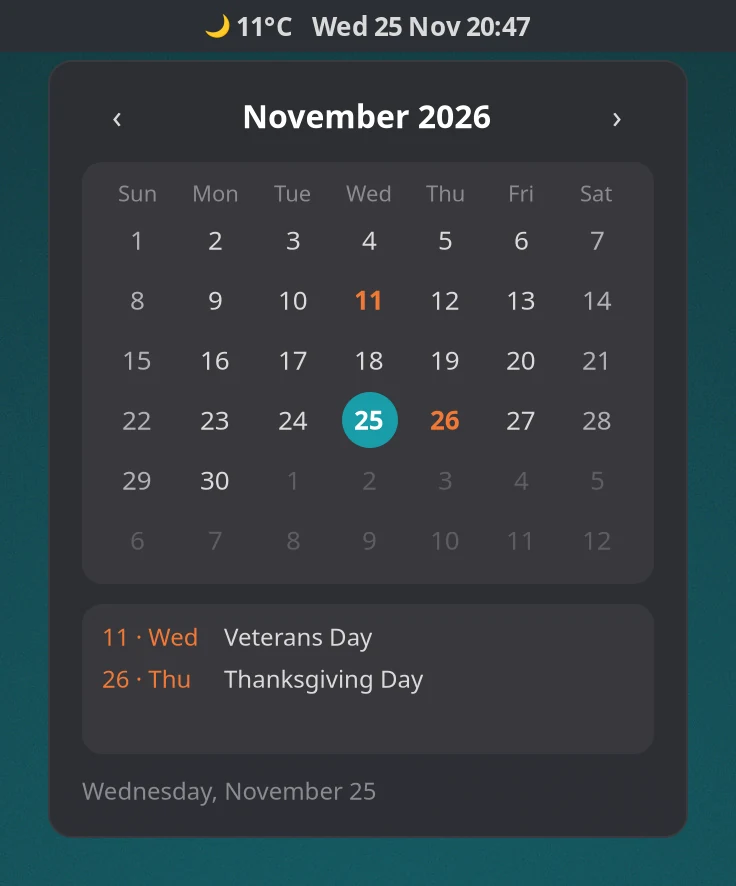
The month, with your country’s holidays.

  • The bar shows the date and time in your language; its tooltip shows the month.
  • Today has a round accent background; Saturday and Sunday are in a lighter grey.
  • Holidays are in orange; hover a day to see the holiday’s name.
  • Below the grid, the month’s holidays, with optional ones marked.
  • National holidays only, plus optional ones; never state or city holidays.
  • Change the month with ‹ ›, the scroll wheel, the arrow keys or Page Up/Page Down.
  • Today, Home or T goes back to the current month.
  • The country comes from your locale; holidays = *BR* picks another, and *none* turns them off.
  • Holidays show where python3-holidays is installed.

Rust + GTK 4 · source · More in the guide · turn off: [enabled.bar] clock = false

Install it alone

Only this component, without the full session. First add the Swaydesk repository, as on the page Install.

Debian 13

sudo apt install swaydesk-calendar

Ubuntu 26.04 · Mint 27

sudo apt install swaydesk-calendar

Arch Linux

sudo pacman -Syu swaydesk-calendar

On Arch, the holidays aren’t in the official repositories, so the calendar shows no holidays there.

Start it on plain Sway

It starts from its Waybar module, below.

In Waybar

In ~/.config/waybar/config.jsonc, add "custom/swaydesk-calendar" to modules-left, modules-center or modules-right, and paste the module from this file next to your other modules:

/usr/share/swaydesk/waybar/swaydesk-calendar.jsonc

The file's first lines say what each click does. The icons come from the Symbols Nerd Font, which the package brings.

Shortcuts

Click the date

Those of the Swaydesk profile, the default. The other profiles are in Shortcuts.