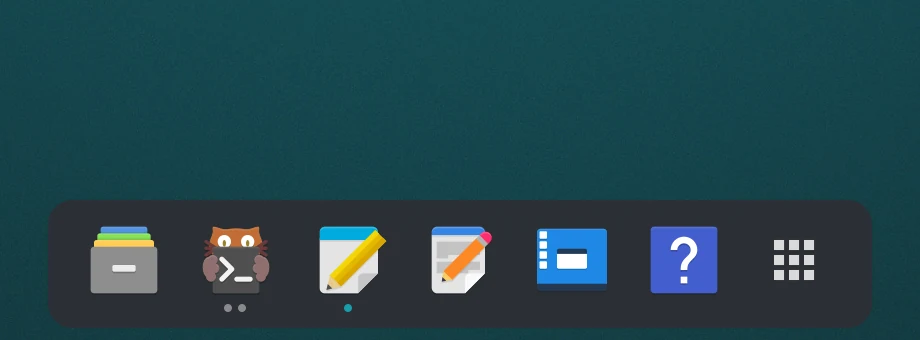
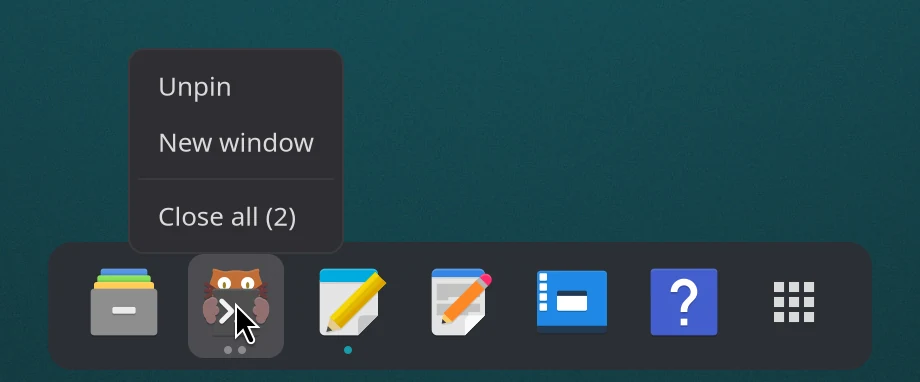
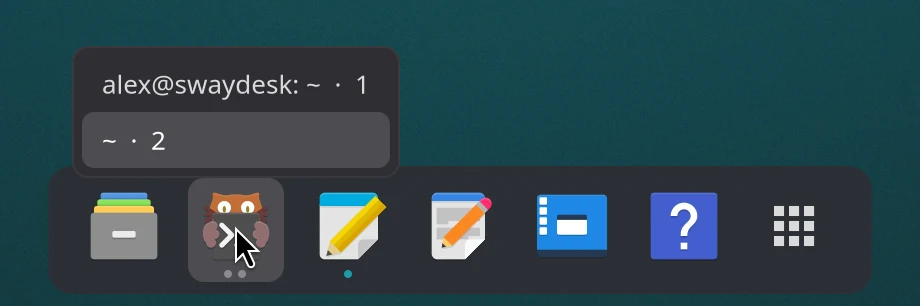
The dock, with one app open in two windows and another focusedThe right-click menu: Unpin, New window and Close all (2)A click on an app with several windows lists each one, with its workspace
Pinned and open apps, with a right-click menu. It hides when a window needs the room, or stays visible.
Click an app to open it or focus its window; with several windows, pick one from a list.
One dot for one window, two for several; accent dots on the focused app, orange when it’s urgent.
Right click: Pin or Unpin, New window, and Close or Close all.
Drag a pinned icon to change the order.
The Applications button at the end opens the app grid.
One dock per monitor; in auto-hide mode, push the pointer against the bottom edge to show it.
It never takes keyboard focus, except while its right click menu is open (Esc closes it).
With no pins yet, it shows the file manager and the first terminal installed; nothing is saved until you change them.
Apps opened from the dock get their own systemd scope.
Only this component, without the full session. First add the Swaydesk repository, as on the page Install.
Debian 13
sudo apt install swaydesk-dock
Ubuntu 26.04 · Mint 27
sudo apt install swaydesk-dock
Arch Linux
sudo pacman -Syu swaydesk-dock
Start it on plain Sway
In ~/.config/sway/config:
include /usr/share/swaydesk/sway/config.d/50-swaydesk-dock.conf
It runs as a systemd user unit, restarted if it crashes, and does nothing inside the Swaydesk session. Put the include after your config's set $mod. Without a systemd user session, use the exec line in the file's last comment instead.
Shortcuts
Push the pointer against the bottom edge
Those of the Swaydesk profile, the default. The other profiles are in Shortcuts.