~/swaydesk/components/notifications

← All components

Notifications

Notifications

Notifications

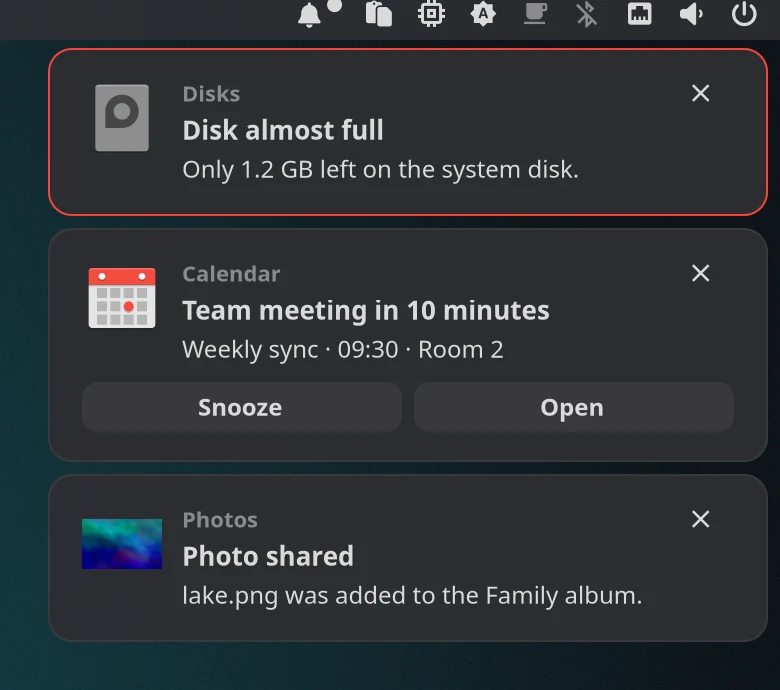
The service that receives the apps’ notifications and shows the pop-ups in the corner.

  • Pop-ups at the top right of the focused monitor, newest on top, up to 5 at once.
  • Normal ones leave after 10 seconds and low-priority ones after 5, unless the app sets its own time.
  • Critical ones have a red border and stay until you close them.
  • Clicking a pop-up runs its default action, or just closes it; up to 6 action buttons show below the text.
  • Shows the app’s image or icon, and bold, italic and underlined text.
  • Apps can update a notification in place, such as a progress or volume level.
  • Do not disturb for 1 hour, 2 hours or until you turn it off: only critical ones still pop up.
  • Right click the bar’s bell to turn Do not disturb on or off.
  • The last 200 stay in memory for the notification list (Super+C).

Rust + GTK 4 · source · More in the guide · turn off: [enabled] notifications = false

Install it alone

Only this component, without the full session. First add the Swaydesk repository, as on the page Install.

Debian 13

sudo apt install swaydesk-notifd

Ubuntu 26.04 · Mint 27

sudo apt install swaydesk-notifd

Arch Linux

sudo pacman -Syu swaydesk-notifd

Start it on plain Sway

In ~/.config/sway/config:

include /usr/share/swaydesk/sway/config.d/50-swaydesk-notifd.conf

Super+N shows the notifications. Only one notification server can run: stop mako, dunst or swaync first.

It runs as a systemd user unit, restarted if it crashes, and does nothing inside the Swaydesk session. Put the include after your config's set $mod. Without a systemd user session, use the exec line in the file's last comment instead.

Shortcuts

Those of the Swaydesk profile, the default. The other profiles are in Shortcuts.